When I began building Atlas, I had to think about how I was going to interact with my console to play games.
I initially thought of building a handheld console, or by connecting a regular keyboard, but I scratched the idea due to various reasons.
When I decided to stick to a regular console, I then had to decide which type of controller I want to build.
There’s some options.
Integrated controller:
The console is always connected to the controller and they are both integrated as if they were one.
There’s clear advantages to doing it, for example: No extra code, No need to complicate things, just connect the buttons directly to the pins and surround the cables with something to make it pretty.
There’s also disadvantages to this aproach, for example: If the controller breaks the entire console needs to be dismounted just to unplug the cables, It is very easy to missplug a cable or break it if not careful.
Controller as a periferal:
This aproach requires a separate microcontroller that acts as the brain for the controller, which then transmits the information to the console.
Some advantages are: Easy testing, Switching controllers for a different experince, Some games might require a specific set of buttons whilst others do not.
But it comes at a cost: More code, Multiple microcontrollers, Slightly more expensive.
What was my choice?
Even though it requires a bit more code and headaches, I wanted to try building my controllers as periferals.
And I had my reasons to go with this design:
First of all, I’m just prototyping now, this aproach allows for easy change if I don’t like the way it feels or responds.
Secondly, it is how consoles used to work back in the day.
Last but not least, I was running out of pins on my main microcontroller and this aproach would let me add as many buttons and joysticks as I needed.
So, how is this choice looking in the present?
It is safe to say that my controller is in a very early stage but I am happy with the choice I made.
For now I am just using the other ESP32 I have to prototype the controller, but I will buy a more suitable microcontroller for the job after I’m finished.
My main ESP32 gives power to the controller via the 5V pin, which both of them are connected directly, just as the ground pins.
In order to transmit data from the controller to the console, I decided to use the UART protocol. That way I just needed to use two additional pins on my main microcontroller. Yes, that’s it two more pins.
After checking my total pin count, I realized I don’t need to use any other pins and I still have some to spare for other periferals if I ever need them.
Connection:
The way UART works is by using two data pins, RX and TX which need to be connected to the main board, but here’s the catch:
The RX pin on the controller needs to be connected to the TX pin on the main board and the TX pin on the controller needs to be connected to the RX pin on the main board.
My current setup is a bit messy, but because its my first embedded project, I just needed to figure out how to connect everything and will be cleaned up after I’m done prototyping.
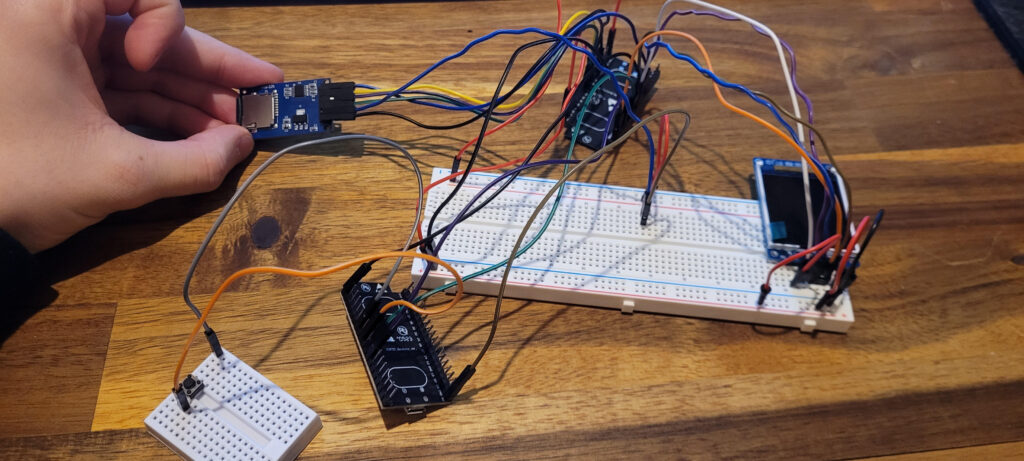
As it can be seen from the image, there’s a small Display and an SD reader connected to the main ESP32 and on the bottom-left handside corner a smaller breadboard can be seen with just one button. There’s code programmed and ready for six buttons though, I am only missing the joystick, which should arrive in a couple of days.
After making sure it all works together, I will clean up a bit the controller connection to the main ESP32 by using two female Mini-DIN connectors and will be connected by a single male to male Mini-DIN connector.
Controller layout:
A small and flat joystick will be used as a four direction movement controller with an additional click for interaction or switching states which will be used by the left thumb.
At the very middle, two buttons will stand out: Dock(⌂) and Warp(⏸). The functionality for theese two buttons may vary depending on the game, but will be used for menues or special actions.
For interacting with the right hand, the controller will have four buttons, which going clockwise starting from the very top, I’ll have: Nova(☀), Luna(☾), Pulsar(✦), Orbit(⬟). Theese buttons will be action buttons.